
Blog / 6 November 2026
Fleet control for MSPs
Site & Fleet shows the health of every server, service and organisation on a site, and lets operators act on it with approvals and undo windows.
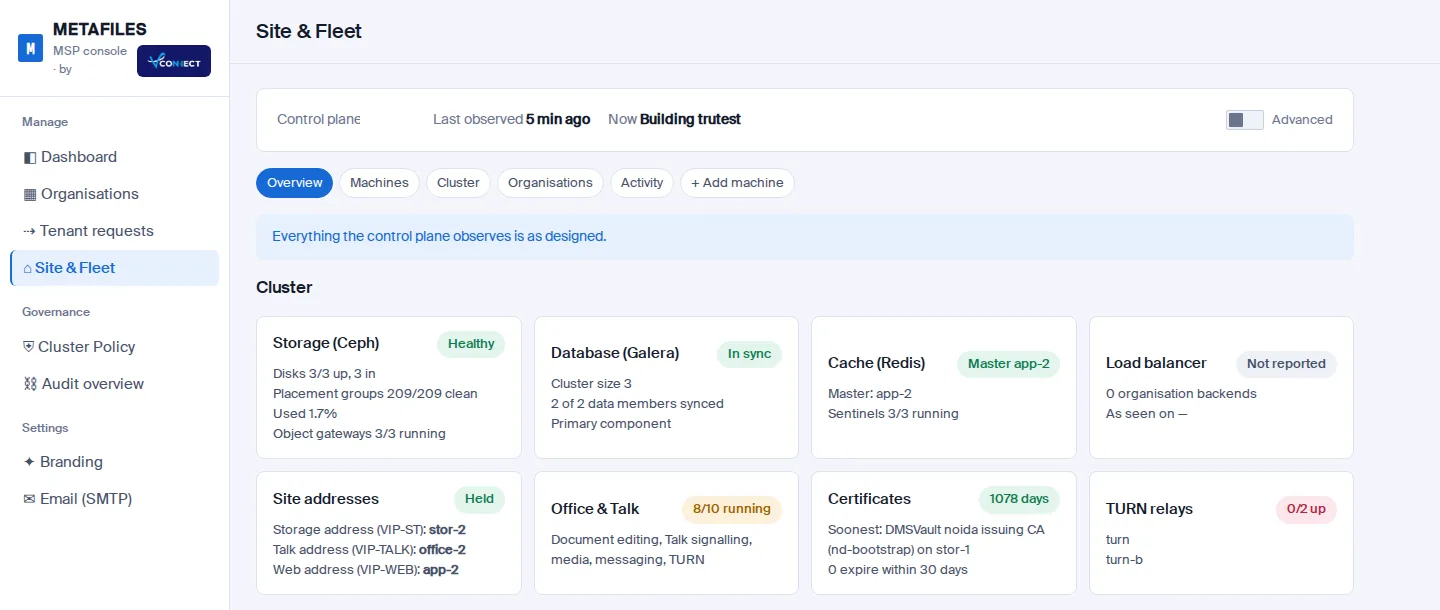
Running file sharing for many customers is more than creating organisations. Someone has to know that storage is healthy, that the database is in sync, that certificates are not about to expire, and to act when a server needs a restart. Site & Fleet in the MSP console puts that on one page.
Site & Fleet: storage, database, cache, load balancer, addresses, Office and Talk, certificates and relays at a glance.
What it shows
- Overview: one line that says whether everything the control plane observes is as designed, then a card per part of the site: storage health and capacity, database cluster state, cache master, load balancer, the site's shared addresses, Office and Talk, certificates and call relays.
- Machines: every server with its role, uptime, CPU, memory, disk and load, and what it currently holds.
- Cluster and Organisations: where each organisation's portal runs, and whether it is answering on every app server.
- Activity: every fleet action, who asked for it and how it ended.
Details for engineers (versions, checks and drift against the site's definition) sit behind an Advanced switch, so the page stays readable for everyone else.
Acting, safely
Each machine has its own page with health checks, maintenance and restart actions. Every action is classed by risk:
| Tier | Example | What it takes |
|---|---|---|
| T1 | A health check | Runs at once, read-only |
| T2 | Onboarding a spare machine | An undo window during which anyone can cancel |
| T3 | Reboot, retire | A typed confirmation and a second operator |
The site refuses anything that would take a role below its minimum, and it says why rather than failing half way.
Adding machines
Add machine takes a new server into the site: choose a role, check the machine's identity and run a read-only pre-flight check of its size, operating system, time sync and ports before anything is changed. Today a new machine can join as a spare. Read about the next step in Add a machine with one command.
Coming: Provider integrations that create machines for you (such as Proxmox, OpenStack and AWS) are shown as "Coming" in the console until they are released.
Read more in Site & Fleet and Scaling and high availability.