
METAFILES for Windows
Install METAFILES on Windows 10 or 11, sign in through your browser, and get a synced folder, a drive letter and Send to METAFILES in Explorer.
METAFILES for Windows puts your organisation's files in Explorer. You get a synced METAFILES folder with files that download only when you open them, a drive letter, right-click Send to METAFILES and Add/Sync to METAFILES, and sharing straight from Explorer. This page covers Windows 10 and 11; Windows 7 has its own edition.
1. What you need
| Need | Detail |
|---|---|
| Windows 10 or 11, 64-bit | For Windows 7, see Windows 7. |
| Administrator rights to install | METAFILES installs once per PC, for every user of that PC. |
| Your server address and account | https://<organisation>.dmsvault.cloud, your user name and password, from your administrator. |
| About 200 MB of download | The installer is about 193 MB; the version with the cloud drive about 200 MB. |
2. Download and check
- Go to https://dl.dmsvault.cloud/metafiles/ → Windows.
- Pick the MSI (normal), or the Installer with the cloud drive if you need the cloud drive.
- Check it: open a command prompt in your Downloads folder and run
certutil -hashfile METAFILES-3.17.4.<build>-x64.msi SHA256. Compare the result with the value on the page. More in Downloads.
3. Install
By hand: double-click the MSI. If SmartScreen says "Windows protected your PC", click More info → Run anyway (the installer is signed with V-Connect's own certificate). Accept the administrator prompt.
Silent or mass installation (IT, with Group Policy or Intune):
msiexec /i METAFILES-3.17.4.<build>-x64.msi /qn /norestart
| Switch | Effect |
|---|---|
DRIVE_LETTER=S |
Default drive letter for everyone on the PC (users can still change their own) |
NO_DRIVE_LETTER=1 |
No drive letter |
NO_SENDTO=1 |
No "Send to METAFILES" in the right-click menu |
NO_SHELL_EXTENSIONS=1 |
No status icons or METAFILES menu in Explorer |
NO_DESKTOP_SHORTCUT=1 |
No desktop icon |
UPDATE_URL=https://dl.dmsvault.cloud/metafiles/win/x64/check |
Switches update checks on (they are off without it) |
NO_AUTOUPDATE=1 |
Never check for updates, whatever UPDATE_URL says |
To remove the SmartScreen warning company-wide, deploy V-Connect-CodeSigning.cer from the download page to Trusted Root Certification Authorities and Trusted Publishers.
Upgrade: install the newer MSI over the old one. You stay signed in.
4. First run: sign in
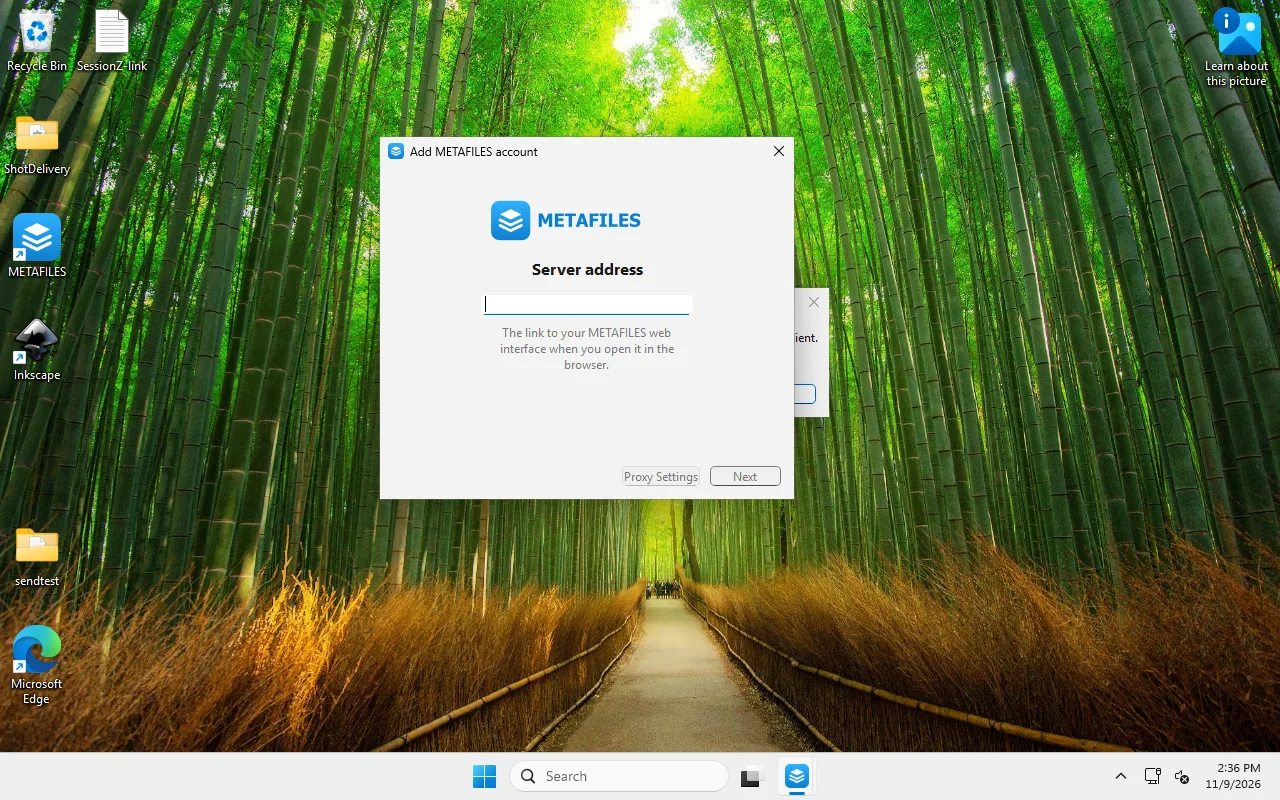 The first-run window asks for your server address.
- Open METAFILES from the Start menu or the desktop icon.
- Type the server address:
https://<organisation>.dmsvault.cloud. Use the plain website address, nothing after it. - Your browser opens. Sign in (with your second factor if your organisation uses one) and click Grant access. The app receives its own app password, so you do not need to do anything else for two-factor sign-in.
- Choose the local folder (by default a METAFILES folder in your user profile) and pick Use virtual files. Click Connect.
That folder is your METAFILES folder from now on. The drive letter and Send to METAFILES both use it.
If your organisation uses device approval, the app waits until your MSP approves the new device.
5. What you get
| Feature | How to use it |
|---|---|
| Two-way sync | Everything in the METAFILES folder syncs both ways. METAFILES has its own entry in Explorer's side bar. |
| On-demand files | You see all your files, but each one downloads only when you open it. Right-click → Always keep on this device or Free up space. A cloud icon means online only; a green tick means it is on this PC. |
| Cloud-only folder | For a folder you never want stored on this PC: tray icon → your account → the folder's ⋯ → Availability → Keep nothing on this PC (cloud-only). Files you copy in upload, then their local copies are released about 15 seconds later; they stay listed. |
Drive letter M: |
Points to your METAFILES folder while you are signed in. Change the letter or switch it off with Start → METAFILES Drive Letter. |
| Send to METAFILES | Right-click any file or folder → Send to METAFILES (on Windows 11 under Show more options). Pick a folder inside METAFILES; recent choices are remembered. Existing files are never overwritten: a clash becomes "name (2)". Sending 200 files is one question, one copy and one notification. |
| …and share it afterwards | Tick the share option in Send to METAFILES. When the upload finishes, the sharing panel opens on the file; type a colleague's name. With several files, the app shares the destination folder and asks first, saying how many items are already in it. |
| Add/Sync to METAFILES | Right-click any folder on your PC → Add/Sync to METAFILES → pick where it belongs in METAFILES. The folder stays where it is and syncs both ways. A whole drive, or a folder already synced, is refused. |
| METAFILES menu in Explorer | Right-click inside the METAFILES folder → METAFILES: share options (links with password and expiry, sharing with people), copy internal link, lock file, open in browser, activity. |
| Tray panel | Activity, search, Talk messages and calls, your online status. |
| Cloud drive | Tray → Mount as Cloud Drive. Needs the installer with the cloud drive. See The cloud drive. |
| Command-line sync | metafilescmd.exe for scripts. Use an app password. |
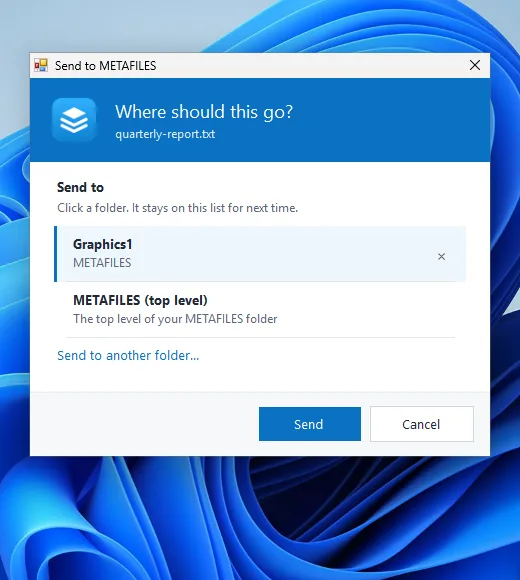 Send to METAFILES remembers the folders you used last.
About the drive letter
- The drive letter points to your local METAFILES folder, so files open instantly and work offline.
- It does not let you copy more than your free disk space: Windows still says "not enough space". For that, use the cloud drive.
6. Large files and speed
- Large files are uploaded in pieces of at most 16 MiB, so big files get through reliably.
- Changes you make on your PC upload straight away. Changes made elsewhere reach your PC within about 30 seconds.
7. Updates
Update checks are off unless your IT team installed with UPDATE_URL. When they are on, the app checks about every 10 hours (it sends only its version, your Windows version and the processor type), shows a message in the tray, and offers Restart & Update in Settings → General. It downloads the full installer (about 193 MB), checks it against the SHA-256 in the update feed, and installs on restart after one administrator prompt.
A user without administrator rights cannot finish an update. On managed PCs, IT should roll out new versions and install with NO_AUTOUPDATE=1.
8. Sign out, remove the account, uninstall
| Action | How | What happens |
|---|---|---|
| Log out | Tray → your account → Log out | Sync stops; the drive letter disappears within seconds. |
| Remove account | Settings → your account → Remove | The connection is removed from this PC. Also revoke the device in the web portal: Personal settings → Security → Devices & sessions. Removing the account in the app does not do that. |
| Uninstall | Settings → Apps → METAFILES → Uninstall, or msiexec /x METAFILES-3.17.4.<build>-x64.msi /qn |
The program, drive letter and shortcuts are removed. Your synced files are left in place. |
| Uninstall the version with the cloud drive | Settings → Apps → METAFILES → Uninstall, or run the installer with /uninstall |
The cloud-drive driver stays installed. |
9. Licence
METAFILES is based on open-source software licensed under the GPL (version 2 or later). The licence and the source-code offer are installed with the program and are on the download page. Settings → Legal Notice shows the open-source copyright notice the licence requires.